Building a collaborative real-time content editor
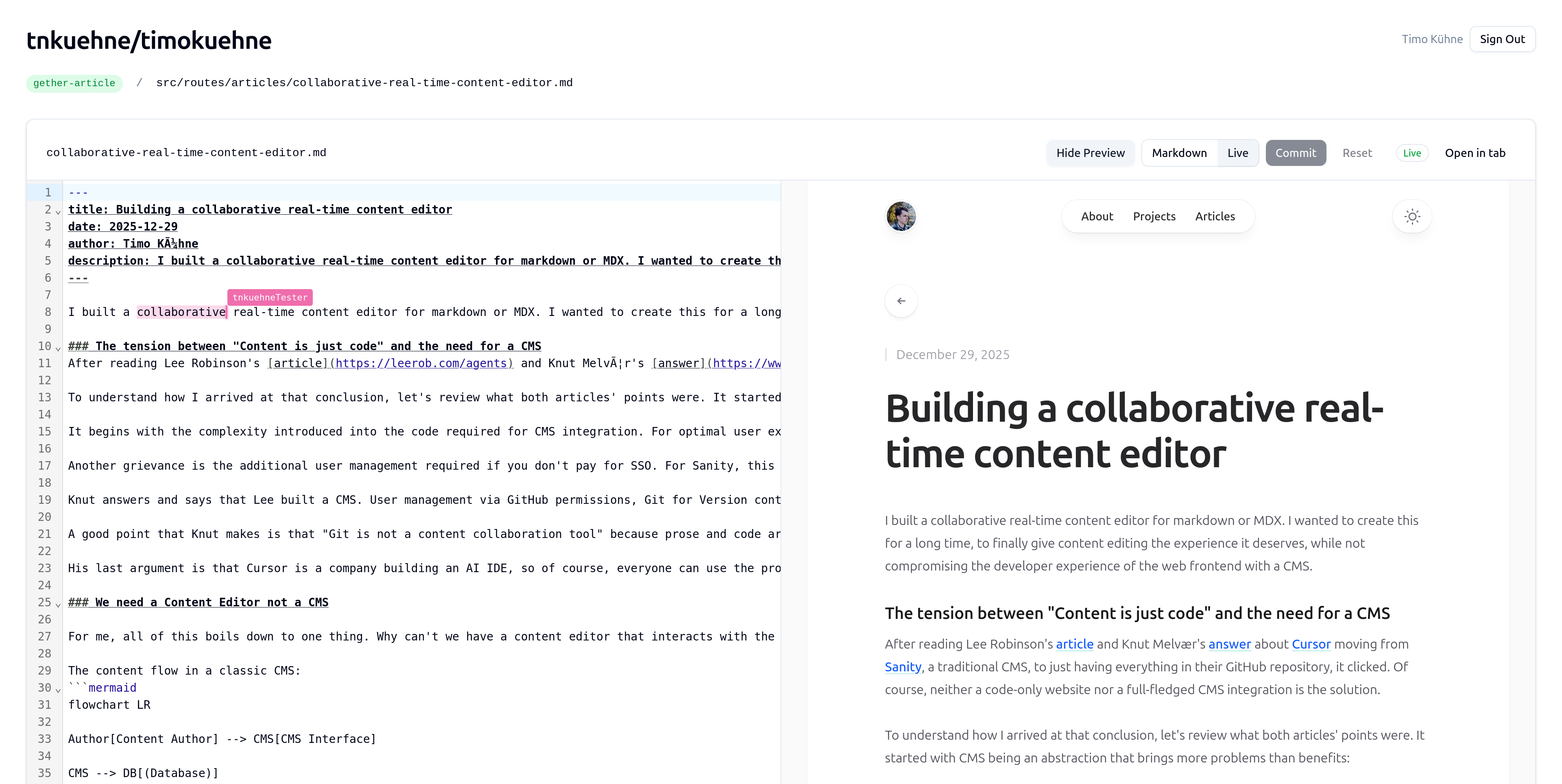
I built a collaborative real-time content editor for markdown or MDX. I wanted to create this for a long time, to finally give content editing the experience it deserves, while not compromising the developer experience of the web frontend with a CMS.
The tension between "Content is just code" and the need for a CMS
After reading Lee Robinson's article and Knut Melvær's answer about Cursor moving from Sanity, a traditional CMS, to just having everything in their GitHub repository, it clicked. I realized you could decouple the editing interface from the frontend entirely. Of course, neither a code-only website nor a full-fledged CMS integration is the solution.
To understand how I arrived at that conclusion, let's review what both articles' points were. It started with CMS being an abstraction that brings more problems than benefits:
It begins with the complexity introduced into the code required for CMS integration. For optimal user experience and reliability, that means prerendering the page. So, you fetch the CMS content when building, but you still want to preview changes, then you need things like NextJS draft mode. Another complexity. Lee's conclusion is to treat content as code. You can use a development server for local previews or pull requests, which triggers a preview deployment. With a link, you can then share it.
Another grievance is the additional user management required if you don't pay for SSO. Sanity gates this feature behind a sales call. You can imagine the price for it. Using GitHub to log in would easily solve this. Regardless, they will also have one eventually because they may start an agent making edits to the website on their behalf.
Knut answers and says that Lee built a CMS. User management via GitHub permissions, Git for version control, and Markdown frontmatter as a content model. While I agree that this is just a form of a CMS, it's definitely less complex.
A good point that Knut makes is that "Git is not a content collaboration tool" because prose and code are fundamentally different. Merge conflicts are semantic, line-based diffing is arbitrary, and real-time matters.
His last argument is that Cursor is a company building an AI IDE, so of course, everyone can use the product the company makes. This is not the same in every company. There may be writers or marketers who haven't written code before, and perhaps they also don't want to.
We need a Content Editor not a CMS
For me, all of this boils down to one thing. Why can't we have a content editor that interacts with the codebase but doesn't need to be integrated into the frontend. We need this to preserve a good developer experience and make context management easy for agents (e.g. just grep markdown file instead of API call to CMS).
The content flow in a classic CMS:
You can see that there is a tight coupling between the CMS and the Frontend codebase, but this doesn't have to be the case. The content flow with a content editor instead of a CMS:
The goals should be: Reusing GitHub authentication, using Git as the storage, enabling real-time collaboration, pull requests for previews and comments, and live preview via the static site generator's development server. All of this should be achieved without modifying the frontend code to maintain low coupling.
Building the missing piece
Now that we are on the same page, let's dive into how I built it. In the past, I used Cloudflare workers a lot and therefore knew about Cloudflare Durable Objects and how they solve the problem of real-time collaboration. Their docs start with "Create AI agents, collaborative applications, real-time interactions like chat", perfect. Boris Tane wrote an article about them and perfectly summed what they are:
Durable Objects give you the benefits of stateful servers (long-lived connections, state, coordination) without the operational overhead. They're serverless, but stateful. They scale automatically, but maintain strong consistency. They're ephemeral (shutting down when idle), but durable (state persists).
For the UI, I used Svelte, as it's my favorite way of building apps.
The overall app architecture looks like the following:
Essentially, I have three of my own services. Everything is connected to the UI service, which handles the orchestration and communication with the GitHub APIs. Authentication is done via better-auth and the GitHub OAuth provider.
For the collaboration service I am using, as said earlier, Durable Objects, which enables serverless usage of WebSocket connections, which are essential for the collaborative editing feature. Because Durable Objects are single-threaded, I need to scale horizontally. This means I create one Durable Object per file that a user wants to edit. In practice this looks like this: ${org}/${repo}/${branch}/${path}
Simplified, I handle the following events: I have three WebSocket events, one initializing the storage with the content, and then a change event triggered when a user types or removes something, as well as a cursor event that shows the cursor placement and possible selection.
async webSocketMessage(ws: WebSocket, message: string | ArrayBuffer) { const data = JSON.parse(message.toString()) as Message; switch (data.type) { case "init": { // Send current document state to newly connected client ws.send(JSON.stringify({ type: "init", content: this.content, })); break; } case "change": { const { changes } = data; if (changes) { // Apply change to content: splice in the new text const before = this.content.slice(0, changes.from); const after = this.content.slice(changes.to); this.content = before + changes.insert + after; // Persist to SQLite storage this.ctx.storage.sql.exec( "UPDATE document SET content = ? WHERE id = 1", this.content ); // Broadcast change to all other clients this.broadcast({ type: "change", changes }, ws); } break; } case "cursor": { // Broadcast cursor position to all other clients if (data.position !== undefined) { this.broadcast({ type: "cursor", position: data.position, selection: data.selection, }, ws); } break; } }}The current change event is a very simple diffing and probably won't scale well, but it was enough for the first version of Gether. For upcoming versions, I plan to migrate this to CRDTs, which would enable conflict-free editing at scale.
Another goal is having a live preview. For this, I wanted to go a bit further than just rendering the markdown. I wanted the real page to update in real-time when the user types.
Cloudflare also offers sandboxes to execute untrusted code, which are perfect for this use case. Sandboxes are an SDK built on top of their new container service. Working like this:
Because the container is running a plain old container, we can make the preview service work for any static site generator that offers a development server. To make this work the user needs to provide a config in their repository with the command for installing and running the development server.
For my blog this looks like this:
{ "packageManager": "pnpm", "root": ".", "install": "pnpm install", "dev": "pnpm dev", "port": 5173}This enables us to start the development server and then expose the port. Of course, probably can't be setup by a writer or marketer but an agent can easily create this config file with a good prompt. I will either automate this through the app or give technical users the prompt to put into their favorite agent.
async startPreview(options: StartPreviewOptions): Promise<PreviewResult> { const { org, repo, branch, githubToken, config } = options; // Create unique sandbox ID from org/repo/branch const sandboxId = `${org}-${repo}-${branch}`.toLowerCase(); // Get or create an isolated sandbox environment const sandbox = getSandbox(this.env.Sandbox, sandboxId); // Clone the repository const repoUrl = `https://${githubToken}@github.com/${org}/${repo}.git`; await sandbox.gitCheckout(repoUrl, { branch }); // Install dependencies const workDir = `/workspace/${repo}/${config.root}`; await sandbox.exec(`cd ${workDir} && ${config.install}`); // Start the dev server as a background process const devServer = await sandbox.startProcess( `cd ${workDir} && ${config.dev} --host 0.0.0.0` ); // Wait for the server to be ready await devServer.waitForPort(config.port, { timeout: 60000 }); // Expose the port and get the public preview URL const exposed = await sandbox.exposePort(config.port, { hostname: this.env.PREVIEW_HOST }); return { success: true, previewUrl: exposed.url, sandboxId };}Previewing the current branch, of course, is not all we need. We need to sync the changes made in the editor that have not yet been committed to Git. Currently, this is only helpful when the development server of the static site generator has hot module reload (HMR).
async syncFile(options: SyncFileOptions): Promise<SyncFileResult> { const { org, repo, branch, filePath, content } = options; // Get the existing sandbox const sandboxId = `${org}-${repo}-${branch}`.toLowerCase(); const sandbox = getSandbox(this.env.Sandbox, sandboxId); // Write the file - dev server detects changes and triggers HMR await sandbox.writeFile(`/workspace/${repo}/${filePath}`, content); return { success: true };}This brings us to the end, we now have a collaborative real-time editor with live preview. If you want to see how everything works exactly, have a look at the open source code of gether.